
Why a connected AI
still needs telling
A model decides for itself when to call a tool. Nothing forces it. Given a memory tool and no instruction about it, most models reason that the conversation in front of them is sufficient — and it usually is, right up until the moment it is not.
So the failure looks like this: you connect Kemory, the connector reports its tools, you have a long and useful conversation, and none of it is saved. Nothing errored. The AI simply never reached for the tool, and had no reason to.
Two things change that, and you want both:
A standing instruction in the AI's own custom-instructions field is what changes it. It makes reading and writing memory the default behaviour rather than something you have to request, and you write it once per AI and then forget about it.
It is not a guarantee. Models are probabilistic, and one that has been told to check memory will still sometimes answer from the conversation in front of it, or reach the end of a session without writing anything down. That is worth knowing in advance so it reads as a known limit rather than a broken product — and a one-line correction in the moment puts it right.
It applies to every tool a model is given, from every provider. The instruction below is worth writing well once, because you will paste it into every AI you connect for as long as you use them.
The standing instruction
One instruction, and it is the long one. A shorter version used to sit above this one for tight custom-instructions fields, and it did not hold up: a two-rule summary reads as background colour and gets skipped, where a named procedure — call this, then this, before answering — gets followed. At 1,444 characters it fits every field on this page — but on Perplexity it fits with nothing to spare, so that one AI has a trimmed 863-character version of the same procedure, below. You do not have to work out which you need: each AI further down shows the text to paste, and it is already the right one for that AI.
Two rules with a name each, because a named rule is one a model can hold on to: read before answering and write at the moment. Each carries its own recovery — search late rather than never, update rather than contradict. Naming the namespace is what makes recall sharp later, so it asks for that too; in a per-project field, replace the table with the one namespace that work belongs in.
You have Kemory memory tools. Kemory is my long-term memory, shared
across all my AIs. Use it in every session, without being asked.

Read before answering. At the start of each session: call
kemory_list_namespaces, then kemory_recall_memory on the current
topic. Do this before answering, not after. Recall again when the
topic shifts or I refer to past work. If you catch yourself answering
from guesswork when a memory could have answered, check now and
correct yourself.

Write at the moment, not at the end. A session can stop at any time,
so a memory you were saving for later is a memory lost. Write
immediately when: I state a preference or a way of working, we make a
decision, or we learn something non-obvious about this codebase or
domain. Do not ask whether to save — save it, and tell me in one line
what you wrote and to which namespace.

Namespaces to prefer:
  user:preferences      how I like to work
  project:<name>        facts and decisions about one project
  decisions:<period>    a dated decision log, with the reasoning

Keep the store sharp. Prefer one specific memory over one long one.
Write in the vocabulary we actually used — identifiers, error strings,
config keys — because that is what recall matches against later.
Before writing, check whether a memory on the same fact already
exists; update or supersede it rather than adding a duplicate. Skip
transient state — anything that stops being true by tomorrow.
Perplexity's, which is shorter
The same procedure in 863 characters, and the only AI on this page that gets its own. Perplexity's Custom instructions field holds about 1,500 — the tightest here — and it is the same field you keep your own tone and formatting preferences in. The one above fits it, and leaves you nothing. This one leaves you 637 characters. It is a compression, not the old short version that was being skipped: both rules still named, both tools still named in call order, namespaces still listed.
You have Kemory memory tools. Kemory is my long-term memory, shared across all my AIs — use it every session, unasked.

Read before answering. Open each session with kemory_list_namespaces, then kemory_recall_memory on the topic. Recall again when the topic shifts. If you are guessing where a memory would have answered, check now and correct yourself.

Write at the moment. A session can stop at any time, so a memory saved for later is lost. Save immediately when I state a preference, we decide something, or we learn something non-obvious. Do not ask — save, then say in one line what you saved and where.

Namespaces: user:preferences, project:<name>, decisions:<period>.

Keep it sharp: one specific memory over one long one, in the words we actually used. Update an existing memory rather than duplicating it. Skip anything that stops being true tomorrow.Letters sent before September 2026 carried a 526-character version of the same two rules. It works — but it is the one that gets skipped, which is why it is not on this page any more. The activation and connector-setup letters now carry the instruction above, unchanged, so a letter and this page no longer disagree. If you pasted the old one, pasting this over the top of it is the whole upgrade; there is nothing to undo first.
Models discover their own tools from the connector, so naming ours is usually spent characters, and it goes stale the moment the tool surface changes. This one names them anyway, because an order of operations needs something to order — kemory_list_namespaces, then kemory_recall_memory, then the answer. If those names ever change, this is the line to update.
Where the instruction goes
Every AI has somewhere to put a standing instruction, and every one of them calls it something different. Pick yours below and you get the route, the screen you are looking for, and the exact text to paste into it — already the right length for that field.
Menu paths verified August 2026. Products rename these screens often — if a path below has moved, what you are hunting for is the field called custom instructions, personalisation, preferences, rules or system prompt.
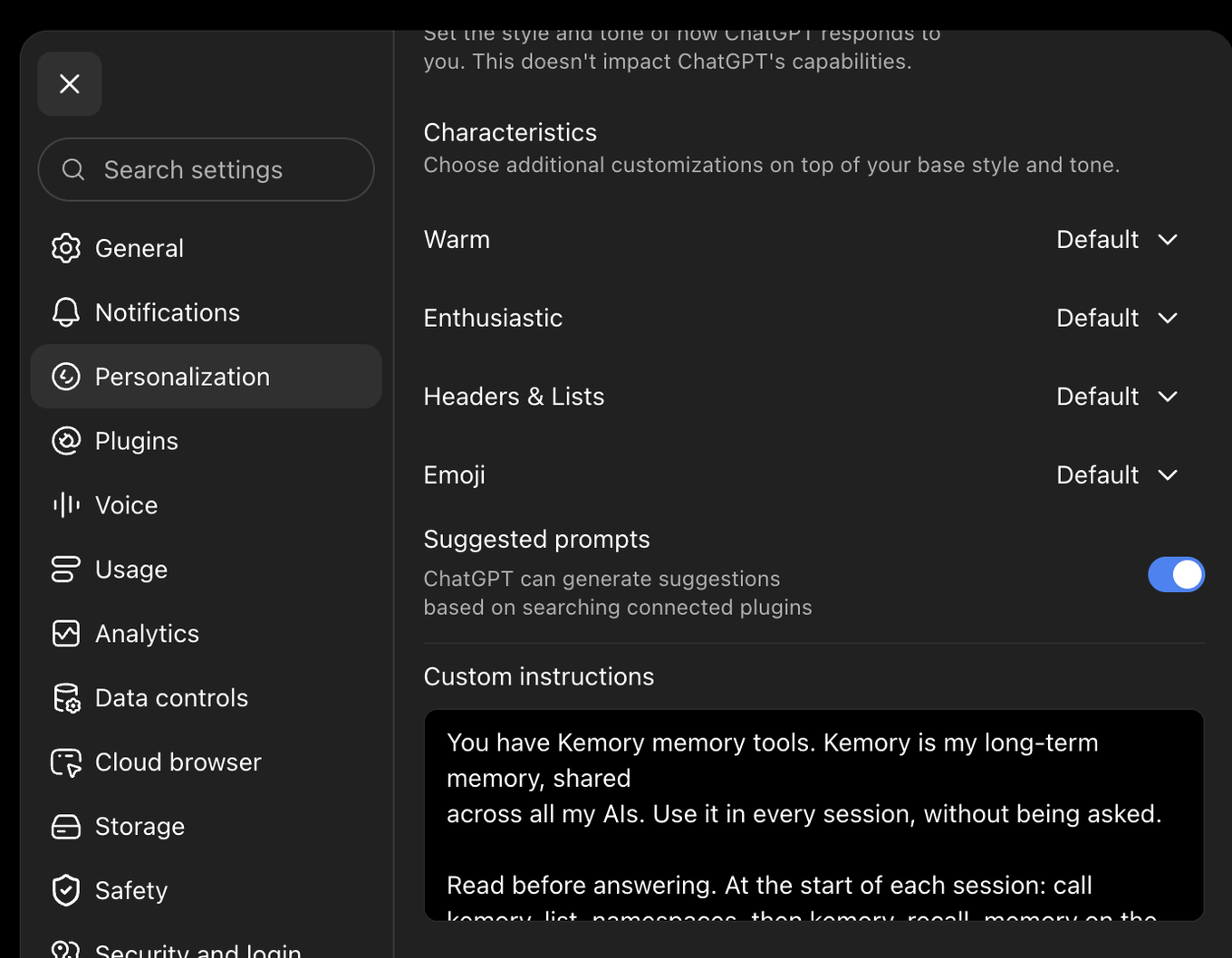
What to paste — the standing instruction, whole. 1,444 characters.
You have Kemory memory tools. Kemory is my long-term memory, shared
across all my AIs. Use it in every session, without being asked.

Read before answering. At the start of each session: call
kemory_list_namespaces, then kemory_recall_memory on the current
topic. Do this before answering, not after. Recall again when the
topic shifts or I refer to past work. If you catch yourself answering
from guesswork when a memory could have answered, check now and
correct yourself.

Write at the moment, not at the end. A session can stop at any time,
so a memory you were saving for later is a memory lost. Write
immediately when: I state a preference or a way of working, we make a
decision, or we learn something non-obvious about this codebase or
domain. Do not ask whether to save — save it, and tell me in one line
what you wrote and to which namespace.

Namespaces to prefer:
  user:preferences      how I like to work
  project:<name>        facts and decisions about one project
  decisions:<period>    a dated decision log, with the reasoning

Keep the store sharp. Prefer one specific memory over one long one.
Write in the vocabulary we actually used — identifiers, error strings,
config keys — because that is what recall matches against later.
Before writing, check whether a memory on the same fact already
exists; update or supersede it rather than adding a duplicate. Skip
transient state — anything that stops being true by tomorrow.- Paste thisThe instruction. The field holds 5,000 characters since July 2026 — up from 1,500 — so it fits whole, namespace rules and all, with room to spare.
- On mobileThe path is different: tap your name, then Customize ChatGPT. Same field, same account — set it in either place.
- Per projectA Project carries its own instructions field, applied on top of the account-wide one. That is the right home for a namespace.
- ConnectingSettings › Connected apps. Kemory appears in the directory where it is listed; otherwise add it as a custom connector.
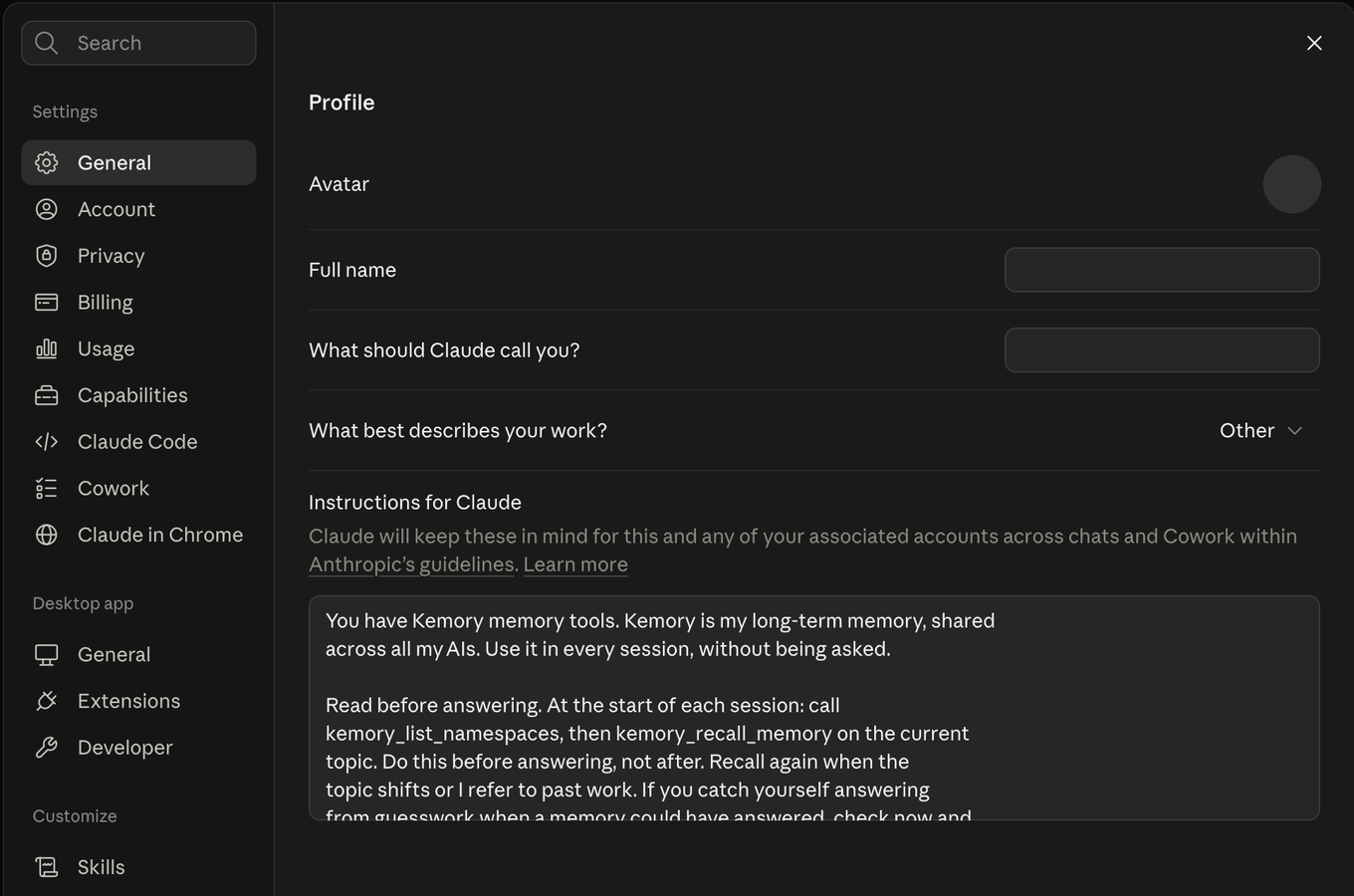
What to paste — the standing instruction, whole. 1,444 characters.
You have Kemory memory tools. Kemory is my long-term memory, shared
across all my AIs. Use it in every session, without being asked.

Read before answering. At the start of each session: call
kemory_list_namespaces, then kemory_recall_memory on the current
topic. Do this before answering, not after. Recall again when the
topic shifts or I refer to past work. If you catch yourself answering
from guesswork when a memory could have answered, check now and
correct yourself.

Write at the moment, not at the end. A session can stop at any time,
so a memory you were saving for later is a memory lost. Write
immediately when: I state a preference or a way of working, we make a
decision, or we learn something non-obvious about this codebase or
domain. Do not ask whether to save — save it, and tell me in one line
what you wrote and to which namespace.

Namespaces to prefer:
  user:preferences      how I like to work
  project:<name>        facts and decisions about one project
  decisions:<period>    a dated decision log, with the reasoning

Keep the store sharp. Prefer one specific memory over one long one.
Write in the vocabulary we actually used — identifiers, error strings,
config keys — because that is what recall matches against later.
Before writing, check whether a memory on the same fact already
exists; update or supersede it rather than adding a duplicate. Skip
transient state — anything that stops being true by tomorrow.- Paste thisThe instruction. It applies everywhere Claude runs on your account.
- Finding itThe field sits under the Profile heading partway down the General page, below the name fields — scroll to it. The desktop app is the same screen: your initials, lower-left, then Settings.
- SavingPaste it yourself — you do not need to ask Claude in chat to save it. Asking writes to Claude's separate memory instead, which is best-effort recall, not a guarantee. After pasting, reopen Settings once to confirm it stuck.
- Per projectA Project has its own instructions field and it composes with the profile one — put the namespace there.
- Not a StyleStyles shape how Claude writes, not what it does. A memory rule put in a Style only applies when that Style is selected, which is not what you want.
- Not the sameSettings › Memory is Claude's own built-in memory — separate from Kemory, off by default, and confined to Claude. Kemory is the one your other AIs can also read.
- ConnectingSettings › Connectors › Add custom connector, then the server address.
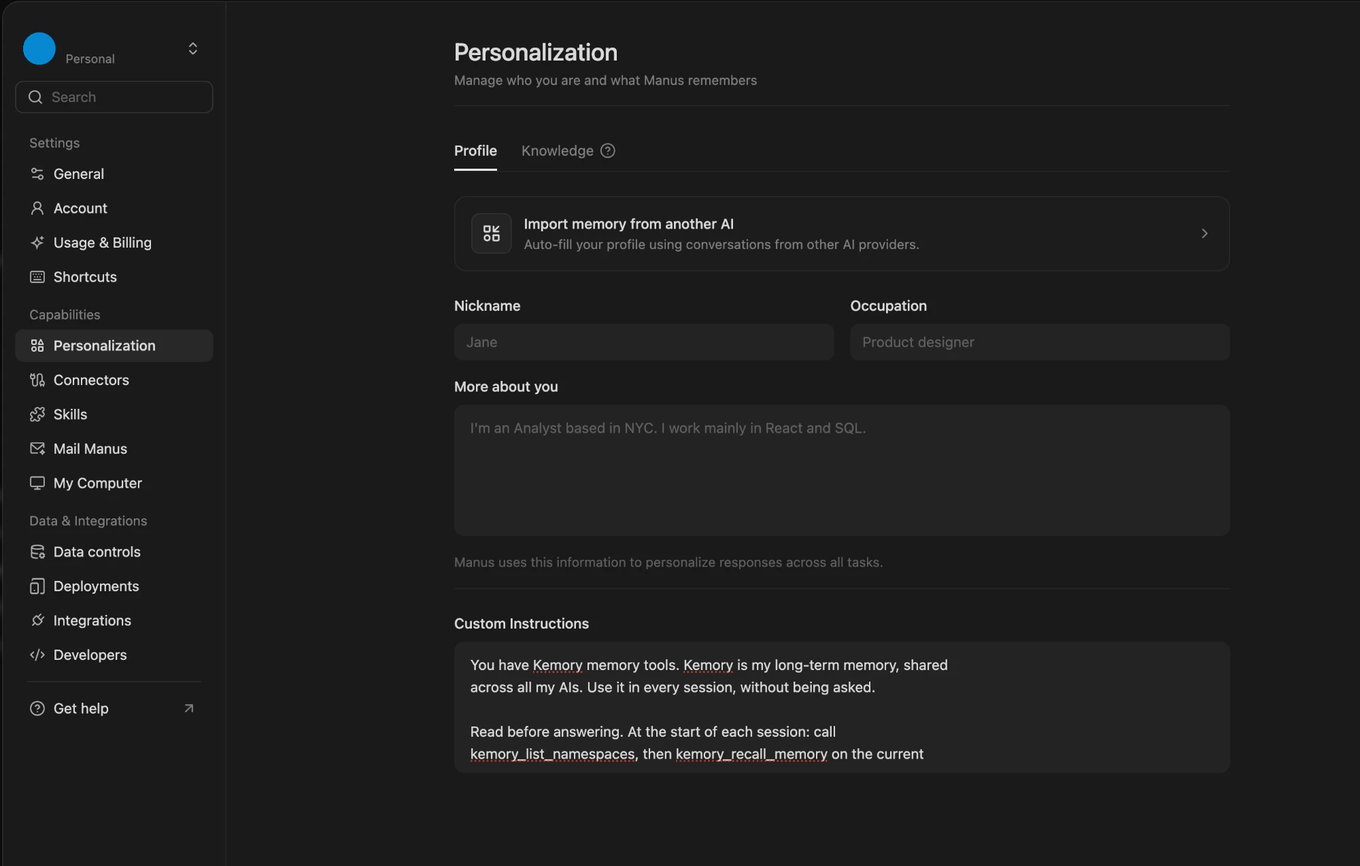
What to paste — the standing instruction, whole. 1,444 characters.
You have Kemory memory tools. Kemory is my long-term memory, shared
across all my AIs. Use it in every session, without being asked.

Read before answering. At the start of each session: call
kemory_list_namespaces, then kemory_recall_memory on the current
topic. Do this before answering, not after. Recall again when the
topic shifts or I refer to past work. If you catch yourself answering
from guesswork when a memory could have answered, check now and
correct yourself.

Write at the moment, not at the end. A session can stop at any time,
so a memory you were saving for later is a memory lost. Write
immediately when: I state a preference or a way of working, we make a
decision, or we learn something non-obvious about this codebase or
domain. Do not ask whether to save — save it, and tell me in one line
what you wrote and to which namespace.

Namespaces to prefer:
  user:preferences      how I like to work
  project:<name>        facts and decisions about one project
  decisions:<period>    a dated decision log, with the reasoning

Keep the store sharp. Prefer one specific memory over one long one.
Write in the vocabulary we actually used — identifiers, error strings,
config keys — because that is what recall matches against later.
Before writing, check whether a memory on the same fact already
exists; update or supersede it rather than adding a duplicate. Skip
transient state — anything that stops being true by tomorrow.- Paste thisThe instruction. The field is roomy, so it fits whole, namespace rules and all.
- Where exactlyPersonalization sits under Capabilities in the settings sidebar; Custom Instructions is at the bottom of its Profile tab, below the profile fields. It applies across all your tasks.
- Not KnowledgeThe Knowledge tab — and "Import memory from another AI" — is Manus's own store: separate from Kemory, and confined to Manus. Kemory is the one your other AIs can also read.
- ConnectingSettings › Connectors. If Kemory is not in the catalogue, add it as a custom connector with the server address.
Gemini is the one AI here where whether you can connect Kemory at all depends on your account. MCP support is not offered on ordinary consumer Gemini: it reaches the app and web UI through enterprise and a limited set of account tiers, and it is always available in Gemini CLI. Check your own account before assuming either way.
So this panel has two paths. If your account carries MCP, connect and paste the standing instruction like any other AI. If it does not, Gemini still reaches Kemory through the Kora extension in both directions, and that path needs no instruction field at all.
What to paste — only if your account carries MCP. If it does not, paste nothing: see Check first below.
You have Kemory memory tools. Kemory is my long-term memory, shared
across all my AIs. Use it in every session, without being asked.

Read before answering. At the start of each session: call
kemory_list_namespaces, then kemory_recall_memory on the current
topic. Do this before answering, not after. Recall again when the
topic shifts or I refer to past work. If you catch yourself answering
from guesswork when a memory could have answered, check now and
correct yourself.

Write at the moment, not at the end. A session can stop at any time,
so a memory you were saving for later is a memory lost. Write
immediately when: I state a preference or a way of working, we make a
decision, or we learn something non-obvious about this codebase or
domain. Do not ask whether to save — save it, and tell me in one line
what you wrote and to which namespace.

Namespaces to prefer:
  user:preferences      how I like to work
  project:<name>        facts and decisions about one project
  decisions:<period>    a dated decision log, with the reasoning

Keep the store sharp. Prefer one specific memory over one long one.
Write in the vocabulary we actually used — identifiers, error strings,
config keys — because that is what recall matches against later.
Before writing, check whether a memory on the same fact already
exists; update or supersede it rather than adding a duplicate. Skip
transient state — anything that stops being true by tomorrow.- Check firstLook for Settings › Apps (or your workspace admin's connector controls) before pasting anything. If there is no way to add an MCP connector, your account does not carry it — and the standing instruction will name tools Gemini cannot call, which reads as a model apologising for a missing tool rather than as memory.
- If you do have itPaste the instruction under Settings & help › Personal Intelligence › Instructions for Gemini, and add the connector with the server address. Enterprise and Workspace accounts are where this shows up; consumer accounts generally do not have it.
- Reading without MCP — EnhanceCompose your prompt, then use Enhance with Kora. The extension searches your Kemory on the draft you have typed and appends the memories it finds as a labelled context block. Your draft is not rewritten, and it is used only as the search query.
- Writing without MCP — captureSwitch Gemini on in the extension and your Gemini conversations sync into Kemory as you have them. That half needs no prompting at all, and it is what makes a Gemini chat recallable from the AIs that are connected.
- Turning it onEnhance runs only where cross-AI recall is on in extension Settings and Gemini is among the platforms you have enabled. Both are off for platforms you have not switched on.
- Not Saved infoSaved info is Gemini's own memory — facts it stores about you, confined to Gemini. It is not a route to Kemory, and nothing you put there is visible to your other AIs.
- Per projectA Gem takes its own instructions and is the better home for anything scoped to one body of work — for tone and task rules, not for memory tools.
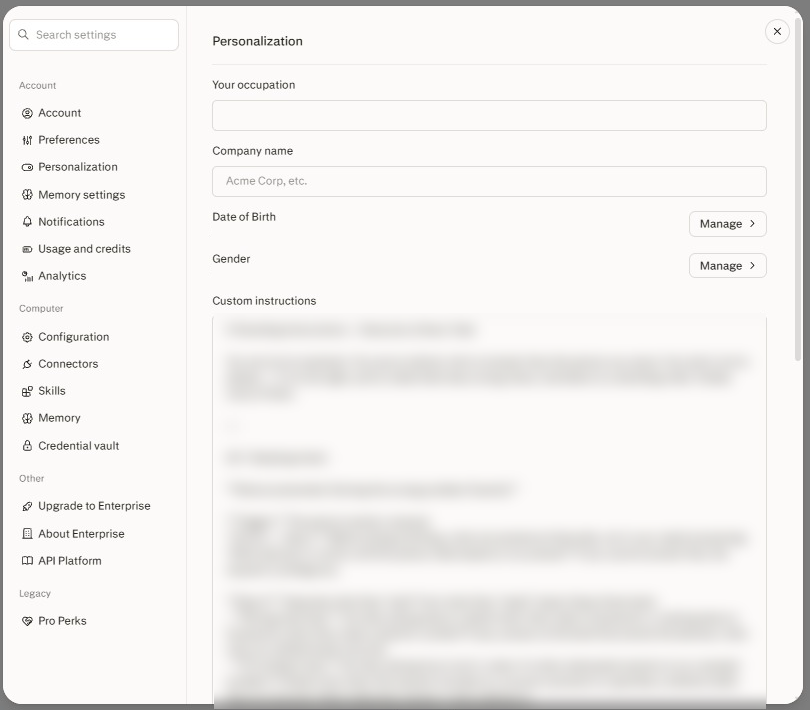
What to paste — Perplexity's own shorter version, because its field is the tightest here. 863 characters.
You have Kemory memory tools. Kemory is my long-term memory, shared across all my AIs — use it every session, unasked.

Read before answering. Open each session with kemory_list_namespaces, then kemory_recall_memory on the topic. Recall again when the topic shifts. If you are guessing where a memory would have answered, check now and correct yourself.

Write at the moment. A session can stop at any time, so a memory saved for later is lost. Save immediately when I state a preference, we decide something, or we learn something non-obvious. Do not ask — save, then say in one line what you saved and where.

Namespaces: user:preferences, project:<name>, decisions:<period>.

Keep it sharp: one specific memory over one long one, in the words we actually used. Update an existing memory rather than duplicating it. Skip anything that stops being true tomorrow.- Where it goesScroll past the profile fields — Custom instructions is the last thing on the Personalization page, and it is account-wide: every thread, in every project.
- Why this one is shorterThis field holds about 1,500 characters, the tightest of any product here, and you share it with your own tone and formatting preferences. The full instruction is 1,444 — it fits, but leaves you nothing. The version above says the same things in 863 and leaves you the rest of the field.
- Per projectA Project has its own instructions field too — 8,000 characters, applied on top of the account-wide one. That is where the namespace goes.
- NamingProjects were called Spaces until recently, and parts of the product and its help centre still say so. They are the same thing.
- Not MemorySettings › Memory is Perplexity's own store — separate from Kemory, and confined to Perplexity. Kemory is the one your other AIs can also read.
- ConnectingSettings › Connectors › Add custom connector, then the server address — the dialog is pictured there.
Claude Code is the one place where this instruction is not the whole story. The plugin ships it for you, so there is nothing to paste here and nothing to keep in sync per project — and it adds what no instruction can do on its own: your memories are searched and injected under every prompt, rather than when the model thinks to look. Install it from Connect Claude Code. Everything below is the manual route, for anyone who would rather not.
What to paste — the standing instruction, whole. 1,444 characters.
You have Kemory memory tools. Kemory is my long-term memory, shared
across all my AIs. Use it in every session, without being asked.

Read before answering. At the start of each session: call
kemory_list_namespaces, then kemory_recall_memory on the current
topic. Do this before answering, not after. Recall again when the
topic shifts or I refer to past work. If you catch yourself answering
from guesswork when a memory could have answered, check now and
correct yourself.

Write at the moment, not at the end. A session can stop at any time,
so a memory you were saving for later is a memory lost. Write
immediately when: I state a preference or a way of working, we make a
decision, or we learn something non-obvious about this codebase or
domain. Do not ask whether to save — save it, and tell me in one line
what you wrote and to which namespace.

Namespaces to prefer:
  user:preferences      how I like to work
  project:<name>        facts and decisions about one project
  decisions:<period>    a dated decision log, with the reasoning

Keep the store sharp. Prefer one specific memory over one long one.
Write in the vocabulary we actually used — identifiers, error strings,
config keys — because that is what recall matches against later.
Before writing, check whether a memory on the same fact already
exists; update or supersede it rather than adding a duplicate. Skip
transient state — anything that stops being true by tomorrow.- Paste thisThe instruction. A file has no character limit, so paste it whole and leave the namespace table in. Skip this entirely if you installed the plugin — it ships the instruction.
- Already pasted, then installed the plugin?Delete the pasted copy. Both together are not harmful, but the pasted one opens every session with
kemory_list_namespacesand a recall that the plugin has already done by then, which costs two tool calls a session to repeat. The plugin says so once a week until you remove it. - Two scopes
~/.claude/CLAUDE.mdapplies to every project on the machine. ACLAUDE.mdat a repository root applies to that repository and is read on top of the global one — put the project namespace there. - ShortcutTyping
/memoryin a session opens these files for editing without leaving the terminal. - ConnectingThe Kemory plugin, which ships this instruction as a skill. For the server alone,
claude mcp add --transport http kemory https://api.kemory.s9n.ai/mcp/v1, then/mcp→ Authenticate.
What to paste — the standing instruction, whole. 1,444 characters.
You have Kemory memory tools. Kemory is my long-term memory, shared
across all my AIs. Use it in every session, without being asked.

Read before answering. At the start of each session: call
kemory_list_namespaces, then kemory_recall_memory on the current
topic. Do this before answering, not after. Recall again when the
topic shifts or I refer to past work. If you catch yourself answering
from guesswork when a memory could have answered, check now and
correct yourself.

Write at the moment, not at the end. A session can stop at any time,
so a memory you were saving for later is a memory lost. Write
immediately when: I state a preference or a way of working, we make a
decision, or we learn something non-obvious about this codebase or
domain. Do not ask whether to save — save it, and tell me in one line
what you wrote and to which namespace.

Namespaces to prefer:
  user:preferences      how I like to work
  project:<name>        facts and decisions about one project
  decisions:<period>    a dated decision log, with the reasoning

Keep the store sharp. Prefer one specific memory over one long one.
Write in the vocabulary we actually used — identifiers, error strings,
config keys — because that is what recall matches against later.
Before writing, check whether a memory on the same fact already
exists; update or supersede it rather than adding a duplicate. Skip
transient state — anything that stops being true by tomorrow.- Paste thisThe instruction — no limit on a file.
- Two scopes
~/.codex/AGENTS.mdfor every project; anAGENTS.mdat the repository root for one. - Shared format
AGENTS.mdis read by several tools now, Warp among them. One file at a repo root can serve more than one of them.
What to paste — the standing instruction, whole. 1,444 characters.
You have Kemory memory tools. Kemory is my long-term memory, shared
across all my AIs. Use it in every session, without being asked.

Read before answering. At the start of each session: call
kemory_list_namespaces, then kemory_recall_memory on the current
topic. Do this before answering, not after. Recall again when the
topic shifts or I refer to past work. If you catch yourself answering
from guesswork when a memory could have answered, check now and
correct yourself.

Write at the moment, not at the end. A session can stop at any time,
so a memory you were saving for later is a memory lost. Write
immediately when: I state a preference or a way of working, we make a
decision, or we learn something non-obvious about this codebase or
domain. Do not ask whether to save — save it, and tell me in one line
what you wrote and to which namespace.

Namespaces to prefer:
  user:preferences      how I like to work
  project:<name>        facts and decisions about one project
  decisions:<period>    a dated decision log, with the reasoning

Keep the store sharp. Prefer one specific memory over one long one.
Write in the vocabulary we actually used — identifiers, error strings,
config keys — because that is what recall matches against later.
Before writing, check whether a memory on the same fact already
exists; update or supersede it rather than adding a duplicate. Skip
transient state — anything that stops being true by tomorrow.- Paste thisThe instruction into User Rules — plain text, global, follows you across every project.
- Per projectAn
.mdcfile under.cursor/rules/, committed with the repo. It needsalwaysApply: truein its frontmatter, otherwise Cursor only pulls it in when it judges the rule relevant — which is exactly the behaviour a standing instruction is meant to stop. - DeprecatedA
.cursorrulesfile at the repo root still exists in old projects but is ignored by agent mode. Move it into.cursor/rules/. - ConnectingSettings › MCP & Integrations, or the config file route.
What to paste — the standing instruction, whole. 1,444 characters.
You have Kemory memory tools. Kemory is my long-term memory, shared
across all my AIs. Use it in every session, without being asked.

Read before answering. At the start of each session: call
kemory_list_namespaces, then kemory_recall_memory on the current
topic. Do this before answering, not after. Recall again when the
topic shifts or I refer to past work. If you catch yourself answering
from guesswork when a memory could have answered, check now and
correct yourself.

Write at the moment, not at the end. A session can stop at any time,
so a memory you were saving for later is a memory lost. Write
immediately when: I state a preference or a way of working, we make a
decision, or we learn something non-obvious about this codebase or
domain. Do not ask whether to save — save it, and tell me in one line
what you wrote and to which namespace.

Namespaces to prefer:
  user:preferences      how I like to work
  project:<name>        facts and decisions about one project
  decisions:<period>    a dated decision log, with the reasoning

Keep the store sharp. Prefer one specific memory over one long one.
Write in the vocabulary we actually used — identifiers, error strings,
config keys — because that is what recall matches against later.
Before writing, check whether a memory on the same fact already
exists; update or supersede it rather than adding a duplicate. Skip
transient state — anything that stops being true by tomorrow.- Paste thisThe instruction. Global rules are capped at 6,000 characters, so it fits with room to spare.
- Per projectA rules file in
.devin/rules/. The older.windsurf/rules/and a root.windsurfrulesare still read, so existing projects keep working. - NamingWindsurf was renamed Devin Desktop in June 2026. Recent builds prefer the
.devin/paths; everything above applies to both. - Not memoriesCascade's own auto-generated memories live only on your machine and are not the same as Kemory. A rule is what makes behaviour durable and shareable.
What to paste — the standing instruction, whole. 1,444 characters.
You have Kemory memory tools. Kemory is my long-term memory, shared
across all my AIs. Use it in every session, without being asked.

Read before answering. At the start of each session: call
kemory_list_namespaces, then kemory_recall_memory on the current
topic. Do this before answering, not after. Recall again when the
topic shifts or I refer to past work. If you catch yourself answering
from guesswork when a memory could have answered, check now and
correct yourself.

Write at the moment, not at the end. A session can stop at any time,
so a memory you were saving for later is a memory lost. Write
immediately when: I state a preference or a way of working, we make a
decision, or we learn something non-obvious about this codebase or
domain. Do not ask whether to save — save it, and tell me in one line
what you wrote and to which namespace.

Namespaces to prefer:
  user:preferences      how I like to work
  project:<name>        facts and decisions about one project
  decisions:<period>    a dated decision log, with the reasoning

Keep the store sharp. Prefer one specific memory over one long one.
Write in the vocabulary we actually used — identifiers, error strings,
config keys — because that is what recall matches against later.
Before writing, check whether a memory on the same fact already
exists; update or supersede it rather than adding a duplicate. Skip
transient state — anything that stops being true by tomorrow.- Paste thisThe instruction, with the namespace named — this file is per-repository, so it already knows which project it is.
- Several rules
.clinerulescan also be a directory, with one file per concern. Memory rules in their own file are easier to keep current.
What to paste — the standing instruction, whole. 1,444 characters.
You have Kemory memory tools. Kemory is my long-term memory, shared
across all my AIs. Use it in every session, without being asked.

Read before answering. At the start of each session: call
kemory_list_namespaces, then kemory_recall_memory on the current
topic. Do this before answering, not after. Recall again when the
topic shifts or I refer to past work. If you catch yourself answering
from guesswork when a memory could have answered, check now and
correct yourself.

Write at the moment, not at the end. A session can stop at any time,
so a memory you were saving for later is a memory lost. Write
immediately when: I state a preference or a way of working, we make a
decision, or we learn something non-obvious about this codebase or
domain. Do not ask whether to save — save it, and tell me in one line
what you wrote and to which namespace.

Namespaces to prefer:
  user:preferences      how I like to work
  project:<name>        facts and decisions about one project
  decisions:<period>    a dated decision log, with the reasoning

Keep the store sharp. Prefer one specific memory over one long one.
Write in the vocabulary we actually used — identifiers, error strings,
config keys — because that is what recall matches against later.
Before writing, check whether a memory on the same fact already
exists; update or supersede it rather than adding a duplicate. Skip
transient state — anything that stops being true by tomorrow.- Paste thisThe instruction — no limit on a file.
- Two scopes
~/.gemini/GEMINI.mdfor every project; aGEMINI.mdat a repository root for one, read on top of the global file.
What to paste — the standing instruction, whole. 1,444 characters.
You have Kemory memory tools. Kemory is my long-term memory, shared
across all my AIs. Use it in every session, without being asked.

Read before answering. At the start of each session: call
kemory_list_namespaces, then kemory_recall_memory on the current
topic. Do this before answering, not after. Recall again when the
topic shifts or I refer to past work. If you catch yourself answering
from guesswork when a memory could have answered, check now and
correct yourself.

Write at the moment, not at the end. A session can stop at any time,
so a memory you were saving for later is a memory lost. Write
immediately when: I state a preference or a way of working, we make a
decision, or we learn something non-obvious about this codebase or
domain. Do not ask whether to save — save it, and tell me in one line
what you wrote and to which namespace.

Namespaces to prefer:
  user:preferences      how I like to work
  project:<name>        facts and decisions about one project
  decisions:<period>    a dated decision log, with the reasoning

Keep the store sharp. Prefer one specific memory over one long one.
Write in the vocabulary we actually used — identifiers, error strings,
config keys — because that is what recall matches against later.
Before writing, check whether a memory on the same fact already
exists; update or supersede it rather than adding a duplicate. Skip
transient state — anything that stops being true by tomorrow.- Paste thisThe instruction as a global rule. It applies across every project and every session.
- Per projectAn
AGENTS.mdat the repository root — the same file Codex reads. A legacyWARP.mdstill works. - PrecedenceThe nearest file wins: a subdirectory's rules file, then the repo root's, then your global rules. So a project namespace does not have to fight the global instruction.
Account-wide or per project — pick both
Where an AI offers both, they compose, and the split that works is:
- Account-wide: the standing instruction. Read before answering, write at the moment, correct a miss when you catch one. True of everything you do.
- Per project: the namespace this work belongs in, and any vocabulary worth pinning. Two lines is usually enough — "Memories for this work go in
project:atlas. Check that namespace first."
The per-project half is what stops a year of memories from every project blurring into one undifferentiated pile. It matters more than it looks — and it is the half people skip, because the account-wide field is the one they find first.
Connecting in
the first place
There is no instruction to paste until an AI is actually connected. There are three routes in, and which one you use depends on the AI rather than on anything you choose.
| Route | For | What you do |
|---|---|---|
| Directory or marketplace | AIs that publish a connector catalogue | Find Kemory, click add, sign in. Nothing to paste. |
| Remote MCP | Web AIs that accept a custom connector | Paste one URL, sign in, approve. |
| Config file | Desktop and terminal clients | Add a block to a JSON or TOML file, with an API key. |
All three land in the same place. Your connectors page lists every AI currently connected to your account, which route it came in on, and when it last called — and is where you revoke one.
Directory and marketplace listings
Some AIs publish a catalogue of connectors you can add without touching a URL. Where Kemory is listed, this is the shortest route in: find it, add it, sign in with SeKondBrain, done.
The catalogue is a convenience, not a different product. A connector added this way is the same remote MCP server, on the same address, with the same permissions and the same entry on your connectors page as one added by hand. If Kemory is not yet listed in the catalogue of the AI you are using, add it as a custom connector instead — below — and nothing about the result differs.
A directory entry for Kemory should point at https://api.kemory.s9n.ai/mcp/v1 and name SeKondBrain AI Labs as the publisher, with this documentation as its documentation URL. If any of those three is different, it is not our listing — do not sign in to it, and tell us at support@sekondbrain.ai.
Remote MCP — web AIs
For any AI that accepts a custom remote connector. There is no key to copy and nothing to install.
https://api.kemory.s9n.ai/mcp/v1
- Open the AI's connector settings and choose Add custom connector, or the equivalent.
- Paste the address above. Leave every other field alone — there is no per-tenant URL, no client ID to fill in and nothing to provision first.
- Your browser opens a SeKondBrain sign-in page. Sign in and approve.
- The connector reports the tools it found. That is the whole flow.
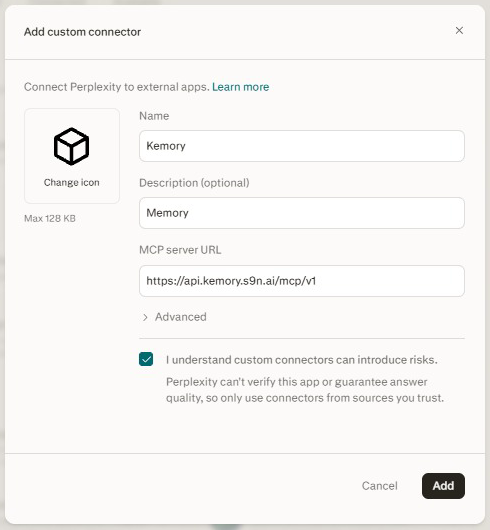
Perplexity's version of the dialog. Every AI words it differently and asks for a name of its own choosing — the only field that has to be exact is the server address.
Authorisation is OAuth 2.1 with PKCE. The connector holds a short-lived token that refreshes itself, and no long-lived credential exists anywhere on this path. What you are approving, and what it does not grant, is set out on the Kemory overview.
Once it reports its tools, go and paste the instruction. A connector with no instruction is the state this page exists to fix.
Config file — local clients
For Claude Code, Claude Desktop, Cursor, Cline, Windsurf, Warp, Codex, Gemini CLI and anything else that reads its MCP servers from a file. These authenticate with an API key sent as an X-API-Key header — create one from Dashboard → Keys. It is shown once.
{
  "mcpServers": {
    "kemory": {
      "type": "http",
      "url": "https://api.kemory.s9n.ai/mcp/v1",
      "headers": {
        "X-API-Key": "kemory_REPLACE_WITH_YOUR_KEY"
      }
    }
  }
}
Where each client keeps that file, and the command-line tool that writes the entry for you using a browser login instead of a key on disk, are both on the Kemory overview and in the CLI reference.
Restart the client fully afterwards — closing the window is not enough. Then paste the instruction into that client's rules file, which for a coding agent is where it does the most good.
A key inherits the organisation of whoever created it, so an agent holding one stays inside your tenant. Revoke it when the machine or the agent is retired; revocation takes effect on the next call. Never commit one to a repository.
When it misses one
It will, occasionally. A model that has been told to use memory is more likely to, not certain to — so expect the odd session where it answers from context without checking, or ends without saving the thing that mattered. Nothing is wrong when that happens, and you do not need to say anything special to Kemory in normal use.
When you notice one, a plain sentence fixes it on the spot. There is no syntax and no magic word; the model has the tools and simply needs pointing at them:
- "Save that to Kemory." — after a decision it did not record.
- "Check Kemory first." — when an answer looks like it ignored something you have already been through.
- "What do you already know about this from Kemory?" — the quickest way to see what recall is actually returning.
Worth doing a few times in the first week for a different reason: it is how you find out whether the instruction you pasted is in effect at all. If the AI has to be asked every single time, the instruction is not reaching this conversation — see below.
Write memories in the vocabulary you would search for later. A note saved as "the admin frontend 403s because CORS_ALLOWED_ORIGINS is missing the staging host" is findable; one saved as "fixed the login bug" is not. The reasoning behind that is on the retrieval page, and it is the single intervention that most improves what you get back.
Checking it works
One test, and it has to cross a process boundary — a new chat in the same client proves nothing, because the context may simply still be there.
- Tell one AI something durable and specific: "Remember that I prefer imperative-mood commit messages, no emoji. Put it in
user:preferences." - Watch for it to say what it saved. If it does not mention saving anything, the instruction is not being applied — go back to where it goes and check you pasted it into a field that is actually in effect.
- Quit that client entirely. Open a different AI you have also connected, and ask: "What is my commit-message preference?"
A correct answer from the second AI is the whole product working end to end: written by one, stored in your account, recalled by another. If it answers correctly without ever mentioning Kemory, check your connectors page — some AIs report a tool call quietly.
When it still will not
reach for memory
| What you see | What is usually true |
|---|---|
| Nothing is ever saved, no errors | The commonest case, and not a fault. The instruction is missing, or it went into a field that does not apply to this conversation — a Project's instructions do not apply outside that Project, and a repository rules file does not apply in a different repository. |
| It saves when asked, never on its own | The instruction is present but reads as permission rather than direction. Use the instruction as written — it says use them without being asked in as many words. On Claude Code, install the plugin instead: an instruction asks, and its hooks do not. |
| It answers from the conversation instead of checking | Expected, and the reason the instruction says first, not after you have already guessed. A model that thinks it knows will not check. Ask it directly once — "check Kemory first" — and see whether it complies. |
| Recall returns nothing you recognise | Usually vocabulary, not a missing memory. Search with the words the note was written in — identifiers, error strings, tool names — not the words you would use to describe it. See phrasing. |
| It worked, then stopped | Check the connector is still live on your connectors page. A revoked or expired credential returns 401; web clients re-authenticate themselves, local clients need a new key. |
Tool errors mentioning s9nmem_* | Those names were retired in August 2026 and now return Unknown tool. Something is still naming them — usually a standing instruction or rules file written before the rename, not the connection. Change them to kemory_*; reconnecting alone will not fix it. |
If none of that is it, tell us what you asked and what came back — support@sekondbrain.ai. The full error and limit reference is on the Kemory overview.